9 meal planning tools for nutrition and fitness professionals
Our recommendation
1. Eat This Much Pro
Best for automatic meal planning with a polished client experience
Eat This Much Pro turns each client’s calorie and macro targets, food
preferences, and exclusions into a full week of meals, recipes, and
grocery lists. Generate a plan in minutes, adjust any meal, and save plans
you want to reuse.
A generator built for the work you do every week
We believe Eat This Much has the best meal plan generator for
professionals. It’s been our core product for over 14 years, and we’re
constantly refining it. Meal swaps stay within your client’s targets, so
changing dinner doesn’t mean rebuilding the day.
The details matter when clients have to cook the meals. Plan around their
available cooking time, build in leftovers, and include foods they already
enjoy. You can automate the repetitive work while keeping control over
what goes into the finished plan.
Your brand on the plan
Every Pro plan includes fully branded PDFs with your logo and no Eat This
Much watermark, plus branded client emails. For many professionals, that
covers everything they need. See a sample branded meal plan.
A proven app for your clients
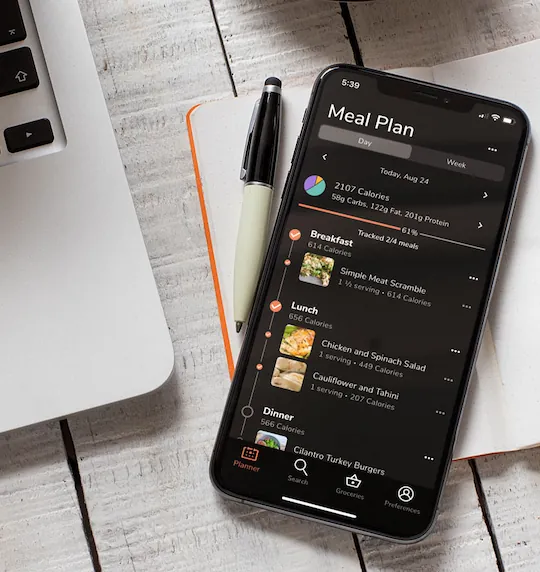
With Collaborate, clients use the established Eat This Much app on
web, iOS, and Android, with your logo displayed prominently as soon as
they open their account. The app is rated 4.7 stars on both the App Store and Google Play, with more than 30,000 ratings and reviews combined.
Set each client’s permissions to match how you work together. Keep
tighter control over the plan or let them make their own adjustments.
Clients can use grocery lists and log meals, and you can review their
food logs before the next session.
Grocery lists connect with Instacart, Walmart, and Amazon Fresh,
making the move from meal plan to grocery order easier.


Why we recommend it
- Automatic weekly plans and grocery lists on every Pro plan.
- Meal swaps that stay within each client’s calorie and macro targets.
- Fully branded PDFs and emails for clients who prefer a simple handoff.
- A highly rated client app, food logging, and individual permissions with
Collaborate.
- One dashboard for managing your clients’ meal plans.
Choose how you deliver
Control starts at $49/month for PDF and email delivery. Collaborate starts at $59/month and adds client accounts, app
access, and permissions. Both starting prices are in USD, billed quarterly,
for up to 10 clients. Higher tiers support larger client lists.
Collaborate uses the Eat This Much website and app, with your logo inside
each client’s account. The website address and mobile app icon remain Eat
This Much’s.
30-day money-back guarantee, no questions asked.
2. That Clean Life
Best for: Curated recipes and templates
That Clean Life centers meal planning around professionally developed recipes and ready-made templates. You can build plans by hand or use the Plus plan’s Automator to generate a plan from calories, macros, and dietary rules. It also connects with Practice Better for sharing nutrition resources with clients.
What it does well
- Curated recipes, templates, and automatically generated grocery lists.
- Share plans through web links, with branded PDF exports and automation on Plus.
Before you choose: The $30 Starter plan does not include the Automator or branded PDF exports. Budget for Plus if those are part of your service. Its pricing page currently lists no free trial.
Pricing: $30/mo Starter; $60/mo Plus, billed monthly.
Sources: Features· Plans and pricing
3. Nutrium
Best for: Nutrition consultations
Nutrium brings nutrition assessment, meal planning, appointments, and client follow-up into one platform. Its tools include nutrient analysis, reusable plans, a meal plan generator, messaging, and a client app. It is worth considering when consultation management is as important to your practice as producing the plan.
What it does well
- Nutrition assessment and client records alongside scheduling and telehealth.
- Client food diaries, progress tracking, and shopping lists in the mobile app.
Before you choose: Its advertised entry price is introductory. Compare the renewal cost and active-client allowance for your practice, then try the planning workflow with the kinds of meals your clients actually eat.
Pricing: From $15/mo introductory annual offer for 10 active clients/month; renewal terms differ.
Sources: Features and pricing· Meal planning· Client shopping lists
4. Practice Better
Best for: Practice administration
Practice Better focuses on running a health practice: appointments, forms, client records, billing, telehealth, and messaging. Its That Clean Life integration brings meal plans and recipes into that workflow. This makes sense if you want nutrition resources alongside the administrative tools you already use.
What it does well
- Scheduling, payments, forms, and client communication in one platform.
- That Clean Life integration for delivering meal plans and other nutrition resources.
Before you choose: Compare the combined subscription cost if you need That Clean Life for meal planning. Practice Better’s entry price alone does not cover that service.
Pricing: Free Sprout tier; Starter from $25/mo, billed annually. Meal planning may cost extra.
Sources: Plans and pricing· That Clean Life integration
5. Foodzilla
Best for: Separately branded apps
Foodzilla combines meal planning, nutrition analysis, client management, and grocery lists. Its branding options range from PDFs to customization inside the Foodzilla app. A separate White Label plan adds an app published under your business name, with your own icon.
What it does well
- Automated planning, client tools, and several levels of branding.
- A separately branded iOS and Android app on its White Label plan.
Before you choose: A separate branded app requires the White Label plan, rather than the entry subscription. Foodzilla lists a typical development and publishing timeline of six to eight weeks. If branded PDFs and your logo inside an established app cover your needs, compare those options before paying for a separate app.
Pricing: Varies by region, client count, and branding tier. See current plans.
Sources: Plans and pricing· Branding options· White Label plan
6. NutriAdmin
Best for: Planning + practice administration
NutriAdmin combines meal planning and nutrient analysis with questionnaires, appointments, client records, and reports. Its generator builds plans from nutrition targets and food preferences, while the editor lets you make adjustments before sharing a PDF or publishing to the client portal.
What it does well
- Automatic planning alongside client records and appointment tools.
- Branded PDFs, nutrition analysis, and a web portal for clients.
Before you choose: The automatic generator starts on Popular, not Basic. Plans are also priced by the number of new client records you can create each month, so compare that allowance with how you bring clients into your practice.
Pricing: $29.16/mo Basic; $41.66/mo Popular with generation, billed annually.
Sources: Meal-planning features· Plans and pricing
7. Everfit
Best for: Workout programming + nutrition
Everfit brings workouts, habit tracking, messaging, and nutrition into the same coaching platform. Its nutrition tools include food journaling, macro targets, recipe books, and meal plans. Automatic meal generation is available through the Meal Plans & Recipe Books add-on.
What it does well
- Workout programming and nutrition support in the same client experience.
- Mobile apps, food journals, macro tracking, and habit coaching.
Before you choose: The free Starter plan is for core training tools; the Pro starting price does not include the meal-planning generator add-on. Compare the total cost at your client count if automated nutrition planning is a main part of your service.
Pricing: Free Starter; Pro from $16/mo for 5 clients, billed annually. Add-ons cost extra.
Sources: Nutrition features· Generator requirements· Plans and pricing· Branding
8. Nutritics
Best for: Detailed nutrient analysis
Nutritics emphasizes detailed nutrition data, recipe analysis, and reporting. Its professional editions serve health, sports, research, and food-service workflows. Clients can use the Libro app to log food and receive resources from their nutrition professional.
What it does well
- Detailed nutrient analysis, recipes, and professional reports.
- Specialized editions for different industries, with client logging through Libro.
Before you choose: Choose the edition that matches your work. If your main task is producing weekly client meal plans, test the time it takes to build and deliver a full week alongside the depth of its analysis tools.
Pricing: Depends on the professional edition and license. See current options.
Sources: Editions and pricing options· Meal-planning workflow· Libro app
9. Healthie
Best for: Virtual care + client follow-up
Healthie brings telehealth, scheduling, client records, messaging, and food journaling together. Its focus is the ongoing relationship between appointments, with tools for delivering care and managing a practice. Consider it when those needs drive your software choice.
What it does well
- Telehealth, scheduling, charting, and payments.
- Client portal and mobile app, with journaling and communication tools that vary by plan.
Before you choose: Its Living Plate Rx meal-planning integration requires Healthie Plus or above and an active Living Plate Rx membership. Include both in your cost comparison. Web and mobile white labeling is an Enterprise add-on.
Pricing: Core from $19.99/mo, billed monthly, for 10 active clients.
Sources: Plans and pricing· Plan and branding details· Meal-planning integration
How to choose the right meal planning software
Start with the work you want to spend less time doing. Then try the software
with a realistic client profile, including food dislikes, cooking time, and
the changes you usually make after a check-in.
A generator that keeps meal swaps on target
Don’t stop at the first generated plan. Swap a dinner and check whether the
replacement still fits your client’s calorie and macro targets. Eat This
Much keeps swaps within those targets, so you can offer variety without
reworking the plan. You can also keep favorite meals, reuse plans, and work
with your own recipes.
Meals that fit a client’s life
Calorie and macro targets are only part of a usable plan. Check how the
software handles food exclusions, meal preferences, prep time, and
leftovers. Try a busy client’s week, not just an unrestricted sample plan.
A client experience worth using
If clients want PDFs, make sure the exports are clear and easy to follow. If
they want an app, try viewing a plan, checking a grocery list, and logging a
meal on a phone. Read app-store reviews and check what clients are allowed
to change. With ETM Collaborate, you choose permissions for each client.
Branding where it matters to your business
Compare branding on PDFs, emails, and the client account separately from a
custom website address or app icon. Fully branded PDFs may be all you need.
For app users, your logo inside a polished, established product can deliver
a professional experience without launching a separate app.
Nutrition tools and practice management
Check which nutrients you can track and how easily you can review a plan
against the targets you set. If you also need appointment booking, billing,
clinical records, or telehealth, compare those requirements separately. You
may prefer a dedicated meal planner alongside the tools you already use.
Grocery lists and delivery
A plan is easier to put into practice when clients know what to buy. Check
whether grocery lists update with meal changes, allow extra items, and
connect with delivery services available where your clients live.
The cost of the features you’ll actually use
Compare prices for your client count, billing period, and required features.
Automation, branding, and app access may require a higher tier or an add-on.
Include any separate subscriptions you need to complete the workflow.
A useful trial is one where you build a week, change a few meals, and
deliver the result. See how much work is left before calling the lowest
subscription price the best value.